Oracle's Fusion Setup and Configuration Registry: A First Hands-On Look
Oracle's Fusion Setup and Configuration Registry: A First Hands-On Look
At AI World today, Oracle announced the Oracle Fusion Setup and Configuration Registry (FSCR), which Oracle describes as a public Git repository that makes Fusion setup and configuration machine-readable and executable by AI agents. Oracle also announced Oracle AI Success Navigator, a set of six implementation agents (Discovery, Design, Configuration, Testing, Integration and Innovation), and its Configuration Agent is the one built on FSCR.
Setup has resisted automation longer than any other part of a Fusion implementation. Data migration has FBDI and HDL, and integrations have REST, but configuration is still mostly a functional consultant working through Setup and Maintenance one task at a time, or a migration team writing Playwright scripts against the UI because no API exists. I've spent the last few months building a tool that moves EBS functional setup into Fusion, so I read FSCR mainly to see whether it changes how that work gets done.
After a day with it, I think it does for part of the work. FSM CSV import works, and FSCR's catalog tells you which setup tasks support it, but the HCM Data Loader route that FSCR uses for ERP, SCM and CX setup isn't usable on my pod yet.
What FSCR is, what it isn't, and my caveats
Before the caveats, I want to be clear that I think FSCR is an amazing first step toward automating configuration. For the first time Oracle has written down, in one place and in a form an AI agent can follow, how each setup task is configured and loaded. That should streamline implementations considerably, so that users and consultants can spend their time adding business value instead of flipping configuration switches one screen at a time.
FSCR isn't an agent, and Oracle doesn't run anything for you. It is a Git repository of instructions, written as Markdown skill files with some Python behind them, that tell an AI agent you run yourself how to use functionality Fusion already has: Setup and Maintenance CSV export and import, the REST APIs, HCM Data Loader, FBDI and ESS jobs. The closest description is a recipe book for an LLM. A few of the recipes use newer plumbing, such as loading a Supplier FBDI file through the HCM Data Loader REST service, which looks up the registered import for the file and runs it, instead of submitting the supplier import job yourself (I cover that route in its own section below), but most of it describes tasks and APIs that consultants already use. The hosted agents Oracle announced under AI Success Navigator are a separate product with no release date yet.
I'd be wary of pointing an LLM at these skills and letting it set up a Fusion environment. Configuration needs to be repeatable, and an LLM isn't deterministic, so the same request can produce a different payload on a different day, and many Fusion setups can't be deleted once they're in use. Where I do see value is in using the skills to work out how a setup task loads, having an LLM generate the files for it, and then pushing those files to Fusion with a deterministic process that you can review, rerun and compare.
The repository also leaves several questions about the skills themselves unanswered:
- I don't know how they were created. The README calls FSCR "a scaffold repository", and 813 of its 1,124 skills are still at version 0.1.0. The offering-level skills tell developers to generate missing child skills from the setup task catalog with a generator skill (
core.fusion-dev.pillar-skill-gen) that isn't in the repository, which makes me think much of the pillar content was generated from the catalog rather than written by someone who had run each task. - I don't know how thoroughly they were tested. The README says FSCR was tested with one model, GPT 5.6 Terra Medium, and the repository contains no test fixtures or test scripts. Nothing says whether the skills came out of a real implementation project.
- A skill that works on one project may not work on yours. It can be accurate and still only describe the happy path, meaning the setup a clean demo environment needs, without the exceptions a real implementation runs into.
- Nobody supports it. The README says FSCR isn't a Fusion product feature and isn't covered by Fusion support, and it is released as sample code under the Universal Permissive License.
Using an unsupported set of skills with no published tests to configure a production environment is a big risk, and it is why this post doesn't run the agents. Before using FSCR I wanted to understand what it does and whether it is accurate, so I spot-checked some of its skills against a live Fusion pod by making the same calls they describe myself. A later post will run the agents against a real request.
What is in the repository
The repository is oracle/Fusion-Setup-Configuration-Registry on GitHub. You supply the environment and the credentials, and what it does to your pod is on you.
What you get is a library of skills, which are Markdown SKILL.md files with rule files and some Python behind them, written for coding agents to read and follow. The repository's AGENTS.md sets the ground rules for any agent working in it, and nothing in it is tied to one AI vendor, so I read it the same way I'd read any agent instruction set.
The repository is organized into five top-level folders:
routeris the entry point, where an implementation request starts and gets routed to the right skills.coreholds technical services such as OAuth authentication, the Fusion REST client, the HCM Data Loader client and a runbook engine.sharedhas the cross-pillar methodology for baseline assessment, implementation planning, setup export and import, the security console and extensibility.pillarsholds the domain content for ERP, HCM, SCM and CX.knowledgehas catalogs and product guidance, including a setup task catalog.
The 26D release has about six thousand files and 1,124 skills, split across the folders like this:
| Folder | Skills | What the skills do |
|---|---|---|
router | 3 | Classify the request and decide which skill runs next |
core | 33 | Authentication, the REST and FSM clients, the Data Loader client, ESS job submission and runbooks |
shared | 82 | Methodology every pillar uses, such as intake, planning, export, import and validation |
pillars | 1,006 | One skill per offering, functional area or setup task |
The pillar skills match the entries in the setup task catalog one for one, and almost half of them are HCM:
| Pillar | Skills |
|---|---|
| HCM | 457 |
| SCM | 243 |
| CX | 196 |
| ERP | 101 |
| Common | 9 |
ERP is the smallest of the four product pillars, so if most of your work is financials, expect thinner coverage for now.
How the skills are organized
FSCR follows Fusion's own setup hierarchy. A request starts at the implementation-router skill, which calls project-objective-classifier to work out the pillar, offering, functional area and scope, and then next-action-planner to choose the next skill. Control then passes to an offering skill (Financials, for example), from there to a functional area skill (General Ledger), and finally to a task skill (Specify Ledger Options) that describes how that one setup task is loaded. Of the 1,006 pillar skills, 42 are at the offering level, 196 are at the functional area level and the remaining 768 are task skills or sit below them. Task skills don't call Fusion themselves. They prepare the data and hand it to a core skill, usually the Data Loader, which makes the call.
Every skill declares a type in its header. The 141 orchestration skills are the ones whose job is to sequence other skills rather than do any work, and they include the 3 router skills, 41 of the 42 offering skills and a mix of functional area and core skills. This is the full breakdown:
| Skill type | Skills |
|---|---|
| Planning | 849 |
| Orchestration | 141 |
| Import | 63 |
| Advisory | 32 |
| Assessment | 14 |
| Verification | 14 |
| Validation | 5 |
| Export | 5 |
| Support | 1 |
Each skill also declares an execution mode. 897 are assisted, meaning a person reviews and approves before anything changes, 192 are hybrid, 28 are advisory, and only 7 are automated, all of them core or shared services such as the FSM REST client and the ESS job submitter. In practice most skills help an agent work out what to configure and then hand the load to one of Fusion's existing methods.
How FSCR loads setup data into Fusion
FSCR doesn't invent a new load mechanism. Every skill ends up on an API that already exists, and the catalog records which one each task uses:
| Load method | Tasks |
|---|---|
| FSM (Setup and Maintenance CSV export/import) | 422 |
| REST | 222 |
| HCM Data Loader (HDL) | 41 |
| FBDI | 16 |
| ESS job | 12 |
| CX import | 5 |
| None listed (planning or advisory only) | 288 |
The most useful single column in the catalog is a flag for whether each Setup and Maintenance task supports CSV import. 647 entries say yes and 96 say no. That is more than the 422 tasks in the table above because FSCR routes some CSV-capable tasks another way, about 170 of them through REST and 27 through HDL, while most of the rest list no load method. That flag answers a question I've had to settle by trial and error on every project, which is whether I can load a given setup through FSM or whether I'm stuck in the UI. The flag doesn't give you the file layout, though. Rule files with keys, defaults, prerequisites and validations exist for roughly 585 tasks, but exact CSV column layouts exist for only about 16, so for everything else the template is whatever an FSM export of your own pod gives you.
Authentication is OAuth. FSCR expects a public OAuth client (a Mobile Application) in your Fusion Identity Domain, with the client ID and scopes in a properties file, and the agent logs in through a PKCE browser flow with tokens cached outside the repository. Its scripts only ever send a Bearer token. Fusion's REST APIs accept Basic authentication as well, and the walkthrough below used it, so the OAuth client is a requirement of FSCR's tooling rather than of Fusion. If your security team won't allow a new OAuth client, you can still make the same calls with an implementation user, but you lose FSCR's scripts unless you adapt their authentication, which I'm doing in a follow-up post.
Loading ERP, SCM and CX setup through HCM Data Loader
FSCR sends every import through the HCM Data Loader REST service, whatever the pillar. Its core/data-loader skill says its routing rule overrides every other import instruction in the repository, so the load methods in the catalog name the API that finally applies the data, and the Data Loader under /hcmRestApi is the way in for all of them. The skill's reference notes say plainly that the /hcmRestApi path doesn't limit the service to HCM objects. HDL has loaded HCM data for years, and FSCR uses it for everything else in four ways:
- An FSM CSV package (a zip that contains
ASM_SETUP_CSV_METADATA.xml) is uploaded to UCM and passed to the Data Loader'sinitiateDataLoadaction withsourceType: "FSM", instead of going to the Setup and Maintenance import resource. - An FBDI zip is matched to a registered FBDI business object by the names of the CSV files inside it, and the Data Loader runs that object's import, so you don't submit the load and import jobs yourself.
- A CSV file or spreadsheet for a setup object that has a REST API is converted into HDL
.datrecords (METADATAandMERGElines), and the Data Loader applies them through that object's REST resource. - CX imports go through the same service, using the CX object's UCM account.
None of this works unless the object is registered with the Data Loader, and the registry can be queried. This is the call I ran, as an HCM implementation user:
GET https://<your-pod>/hcmRestApi/resources/11.13.18.05/dataLoaderBusinessObjects?q=ProductAreaCode='ORA_FSCR'&totalResults=true
REST-Framework-Version: 9
The registry on my pod holds 617 business objects, and 259 of them have the product area code ORA_FSCR, which the registry labels "Setup and Configuration Registry". Oracle seeded them (their CreatedBy is SEED_DATA_FROM_APPLICATION). By object type:
| Object type | Objects | What it covers |
|---|---|---|
ADF_REST | 218 | Setup objects loaded through their REST resource, such as supplier numbering and profit center party relations |
RAW_REST | 34 | REST actions, such as supplierNumberingInitializeSetup |
FBDI | 5 | Price List, item, Planning Common, Import Account Combinations, and Import Segment Values and Hierarchies |
BOSS | 2 | Algorithm Contexts and Reference Data Value Settings |
This is one of the registered objects, trimmed:
{
  "UIName": "Profit Center Party Relations",
  "ObjectType": "ADF_REST",
  "ProductAreaCode": "ORA_FSCR",
  "BusObjTopDiscriminator": "financialOrchestrationProfitCenterPartyRelations",
  "TemplateFileName": "financialOrchestrationProfitCenterPartyRelations.dat",
  "UcmContentId": "UCMFA07827543",
  "CreatedBy": "SEED_DATA_FROM_APPLICATION"
}
Two things tell me this route isn't ready yet, at least on this pod.
The first is that the templates don't work. A registered object can point to a template file in UCM, generated from the object's metadata, which is what you would fill in to build a load. I downloaded the template for each of the 259 objects with GET https://<your-pod>/documents/files/{UcmContentId}/data. 156 of them have no template at all, and the other 103 return a Fusion error instead of a template. Every error is the same apart from the object name:
ERROR: No Matching Business Object found.oracle.apps.hcm.common.dataLoader.metaDataManager.exception.
UnsupportedTopLevelBusObjDiscriminatorException: JBO-HRC:::HRC_DLOAD_MD_BAD_ROOT_DISCRIM:
<MESSAGE><NUMBER>HRC-1035324</NUMBER><TEXT>The discriminator item isn't a supported
top-level discriminator.</TEXT>...
In other words, the Data Loader's own metadata service doesn't recognize objects that its registry lists.
The second is that some objects the skills depend on aren't registered at all. FSCR's Import Suppliers skill builds a Supplier FBDI zip and expects the Data Loader to match its PozSuppliersInt file to a registered FBDI object. I listed every FBDI object on the pod along with the file name prefixes it accepts:
GET https://<your-pod>/hcmRestApi/resources/11.13.18.05/dataLoaderBusinessObjects?q=ObjectType='FBDI'&expand=fbdiMetadata&onlyData=true
That returned the same five objects with 87 file name prefixes between them, such as GlBulkComboInterface for account combinations and PriceListsHeaders for price lists, and nothing for suppliers. A search on names containing "Supplier" found twelve ORA_FSCR objects for supplier-related setup, such as supplier numbering, notifications, user roles and negotiation cost factors, but nothing that imports suppliers. On this pod, the Supplier FBDI load that FSCR describes would stop before upload, because the Data Loader has nothing to match the file to.
Because of both problems I didn't attempt a load through this route, so I can't yet say whether loads succeed once the templates generate. I'll re-test after the next pod update. If you query the registry yourself, watch for two things. The findDataLoaderBos finder paginates badly and returns duplicate rows, and even without a finder, an unfiltered query of all 617 objects stopped at 500 for me, while filtering with q on ProductAreaCode returned all 259. And the findBusinessObjectsForFSCR finder writes to the registry even though it is a GET, so don't call it casually.
The rules FSCR sets for agents
I went in expecting a pile of prompts and found a fairly strict set of operating rules for agents instead, which is the part I'd copy into my own projects first.
- Agents must follow the routed workflow. Having a REST path, a token or a browser available is not permission to use it, and if a workflow step is missing, the agent records the gap and stops instead of improvising a direct call.
- Mutating actions need explicit approval right before execution, with the exact target environment, operation and payload shown.
- There are no blind retries. A 401 can be retried once after a token refresh, but a POST, an import, a loader run or an ESS job is never retried without idempotency or approval.
- Failures are classified (input validation, catalog mismatch, auth, transport, Fusion API, timeout, process failed and so on), and the process logs of failed Fusion jobs are saved.
- Everything lands in a project workspace, including exports, baselines, decisions, run records and even a token-usage log.
I've watched agents "helpfully" retry a failed import three times in a row, so I was glad to see Oracle write these rules down and make them strict.
Spot-checking FSCR's load routes on a live pod
To see whether the skills hold up, I ran the Fusion APIs they rely on against a Fusion demo pod on the 26D release, making each call myself rather than through an agent. For FSM, I called the Setup and Maintenance resources directly rather than going through the Data Loader as FSCR would.
FSM CSV export and import worked, which matters because it is the load method behind 422 of the catalog's tasks. I exported three tasks through the setupTaskCSVExports REST resource, downloaded the packages, and imported the identical packages back through setupTaskCSVImports: AR receipt classes and methods (63 classes), asset categories (77 categories) and project statuses. All three came back clean with zero failed rows, in a minute or two each.
Then I made a real change: I created a new primary ledger through an FSM CSV import and then changed its options with a second import. Fusion validated both imports the way the UI would, and its error messages named the two required fields that the options change has to supply. The next section walks through it with the calls and the data.
The ESS job that completes a new ledger failed because of what looks like a bug in the 26D build. FSCR documents the full parameter payload for the "Review and Submit Accounting Configuration" job, and I submitted it through the ESS REST scheduler. The request was accepted, but it then failed inside Fusion code on a missing method (AVUtilAMImpl.isAgenticAppEnabled), before my parameters were even read. The fault is in the 26D build rather than in FSCR, but it means the end of the ledger flow still needs a click in the UI on that pod.
I didn't load anything through the HCM Data Loader route, for the reasons in the section on it above.
Creating and changing a ledger through FSM CSV, step by step
As with the rest of the post, nothing in this section uses FSCR's agents. I wanted to know what they would actually do to a pod, so I made the same Fusion REST calls their skills describe and read what came back.
The example ledger is 10602FSMLedger, which Fusion gave the ledger ID 300000335865742, and the pod hostname is replaced by <your-pod>. FSCR itself would hand the import packages to the Data Loader with sourceType: "FSM", but I called the Setup and Maintenance resources directly so that each step is visible. All of the calls go through two REST resources under /fscmRestApi/resources/11.13.18.05, which are setupTaskCSVExports and setupTaskCSVImports. I ran them as an implementation user with Basic authentication, and every call sends the header REST-Framework-Version: 9.
1. Export the setup task to get its CSV layout
The export is a POST that names the setup task. GL_MANAGE_PRIMARY_LEDGERS is the task code behind Manage Primary Ledgers in Setup and Maintenance.
POST https://<your-pod>/fscmRestApi/resources/11.13.18.05/setupTaskCSVExports
Content-Type: application/json
REST-Framework-Version: 9

{
  "TaskCode": "GL_MANAGE_PRIMARY_LEDGERS",
  "SetupTaskCSVExportProcess": [ { "TaskCode": "GL_MANAGE_PRIMARY_LEDGERS" } ]
}
Fusion answers with a 201 and a process item. This is the response trimmed to the parts that matter, with the long link URLs shortened:
{
  "TaskCode": "GL_MANAGE_PRIMARY_LEDGERS",
  "ExportSupportedFlag": null,
  "SetupTaskCSVExportProcess": {
    "items": [
      {
        "ProcessId": "100008561618263",
        "TaskCode": "GL_MANAGE_PRIMARY_LEDGERS",
        "ProcessCompletedFlag": null,
        "@context": {
          "key": "100008561618263",
          "links": [
            { "rel": "self", "kind": "item",
              "href": "https://<your-pod>:443/.../SetupTaskCSVExportProcess/100008561618263" },
            { "rel": "child", "kind": "collection", "name": "SetupTaskCSVExportProcessResult",
              "href": "https://<your-pod>:443/.../SetupTaskCSVExportProcess/100008561618263/child/SetupTaskCSVExportProcessResult" }
          ]
        }
      }
    ],
    "count": 1
  }
}
The export runs asynchronously, and the attribute to key off is ProcessCompletedFlag on the process item. It is null in the POST response, false while the export is running and true once it has finished. I polled the process item every 20 seconds, and the export finished on the third poll, about a minute after I submitted it. The first poll looked like this:
GET .../setupTaskCSVExports/GL_MANAGE_PRIMARY_LEDGERS/child/SetupTaskCSVExportProcess/100008561618263
{
  "ProcessId": "100008561618263",
  "TaskCode": null,
  "ProcessCompletedFlag": false,
  "@context": { "key": "100008561618263", "links": [ ... ] }
}
The third poll was identical except that ProcessCompletedFlag was true.
Don't wait for a StatusCode while you poll. The process item doesn't have one, and the result collection under it (.../SetupTaskCSVExportProcessResult) came back with count: 0 and an empty items array on every poll, even after the export had finished. StatusCode only appears when you GET the result item directly, and the key of that item is the same ProcessId:
GET .../SetupTaskCSVExportProcess/100008561618263/child/SetupTaskCSVExportProcessResult/100008561618263
{
  "ProcessId": "100008561618263",
  "ProcessName": "Manage Primary Ledgers_20261027_025407_995",
  "StatusCode": "COMPLETED",
  "FileName": "Manage Primary Ledgers_20261027_025407_995_20261027_1455.zip",
  "@context": {
    "key": "100008561618263",
    "links": [
      ...
      { "rel": "enclosure", "name": "FileContent", "kind": "other",
        "href": "https://<your-pod>:443/.../SetupTaskCSVExportProcessResult/100008561618263/enclosure/FileContent" },
      { "rel": "enclosure", "name": "ProcessLog", "kind": "other",
        "href": "https://<your-pod>:443/.../SetupTaskCSVExportProcessResult/100008561618263/enclosure/ProcessLog" },
      ...
    ]
  }
}
The result item is also the only place where the link to the exported file shows up, because neither the POST response nor the polls include it. It is in the item's links with rel enclosure and name FileContent, next to ProcessLog and three report enclosures (CSVTemplateReport, ProcessResultsReport and ProcessResultsSummaryReport). Since the result item's key is the ProcessId, you can build the download URL yourself without looking anything up:
GET .../SetupTaskCSVExportProcess/100008561618263/child/SetupTaskCSVExportProcessResult/100008561618263/enclosure/FileContent
That returned the zip as application/octet-stream, 65,685 bytes. It holds ten CSV files and a metadata file. GL_PRIMARY_LEDGER.csv is the main one, with 133 columns and a row for each of the 159 primary ledgers on the pod:
GL_LEDGER.csv                      GL_LEDGER_SEG_VAL_ASSIGNMENT.csv
GL_PRIMARY_LEDGER.csv              ORA_GL_LEDGER_RELATIONSHIP.csv
GL_SECONDARY_LEDGER.csv            ORA_LEGAL_ENTITY_BAL_SEG_VAL_DEF.csv
ORA_GL_PRIMARY_LEDGER_CONFIG.csv   ORA_GL_JOUNAL_CONVERSION_RULES.csv
ORA_GL_JOURNAL_CONFIG_DETAIL.csv   ORA_PRIMARY_BALANCING_SEGMENT_VALUE_CONVERSION_RULES.csv
ASM_SETUP_CSV_METADATA.xml
The misspelled JOUNAL file name is Oracle's, and the import expects it spelled that way.
2. Build the import package for the new ledger
I didn't write any of those 133 columns from scratch. An earlier test ledger on the pod, 10409LedgerName, had been created through the UI with the chart of accounts, calendar and currency I wanted, so I used its rows as the model. A short Python script went through every CSV in the export, kept only the rows that mentioned that ledger, renamed it to 10602FSMLedger, blanked the audit columns (CreatedBy, CreationDate and the three last-update columns) and left ShortName empty. The metadata XML went into the new zip unchanged.
for r in rows[1:]:
    if any(c == "10409LedgerName" for c in r):
        r = [NEW if c == "10409LedgerName" else c for c in r]   # rename the model ledger
        r = ["" if h in AUDIT else v for h, v in zip(hdr, r)]   # clear the audit columns
        if "ShortName" in hdr:
            r[hdr.index("ShortName")] = ""                      # Fusion generates it on create
        keep.append(r)
I left ShortName blank because FSCR's rules for Manage Primary Ledgers treat it as service-generated and leave it blank on a new row. Every one of the 159 primary ledgers on the pod has its own ledger ID as its short name, including the UK Primary Ledger (ledger ID and short name both 300000047488112), and Fusion did the same for the new ledger.
The package kept one row in each of GL_LEDGER.csv, ORA_GL_PRIMARY_LEDGER_CONFIG.csv, GL_PRIMARY_LEDGER.csv and GL_SECONDARY_LEDGER.csv, and the other six CSV files went in with just their header line. That made it 31 KB uncompressed, or about 8 KB zipped, against 560 KB uncompressed (66 KB zipped) for the full export.
This is the new row in GL_PRIMARY_LEDGER.csv, cut down to the columns that matter for this ledger. The full header has 133 columns, and most of the ones left out are empty or are flags set to N.
| Column | Value |
|---|---|
ORA_GL_PRIMARY_LEDGER_CONFIG.Name | 10602FSMLedger |
Name | 10602FSMLedger |
ShortName | blank |
Description | blank |
LedgerCategoryCode | PRIMARY |
CurrencyCode | USD |
PeriodSetName | 10315FY25 |
AccountedPeriodType | MONTH6689424697 |
FirstLedgerPeriodName | Jan-25 |
KeyFlexfieldCode | GL# |
StructureInstanceCode | 28Ledger |
BalSegColumnName | SEGMENT1 |
BalSegValueSetCode | 28Company 28Ledger |
SlaAccountingMethodCode | CASH_BASIS |
SlaAccountingMethodType | S |
SlaDescriptionLanguage | blank |
FutureEnterablePeriodsLimit | 1 |
RetEarnCcidSegments | blank |
SuspenseAllowedFlag | N |
CreatedBy, CreationDate | blank |
I kept Fusion's own file format. The export files have no byte order mark, every value is in quotes and lines end with a line feed, and I wrote the package the same way.
3. Import it
The import mirrors the export, with the zip passed in the body as a base64 string (about 11,000 characters for this package):
POST https://<your-pod>/fscmRestApi/resources/11.13.18.05/setupTaskCSVImports
Content-Type: application/json
REST-Framework-Version: 9

{
  "TaskCode": "GL_MANAGE_PRIMARY_LEDGERS",
  "SetupTaskCSVImportProcess": [
    { "TaskCode": "GL_MANAGE_PRIMARY_LEDGERS", "FileContent": "UEsDBBQAAAAIAPtWW12z..." }
  ]
}
The response gave a ProcessId of 100008561618419. The import's process item also carries a FileContent enclosure link, but that is the package you uploaded, not the result. I polled ProcessCompletedFlag the same way, and it was true on the second poll, about 40 seconds in. Then I downloaded the ProcessLog enclosure from the import's result item, because the log is where the status of each object is reported. It comes down as plain text with the line breaks written as the literal characters \r\n and the tabs as \t, so it needs a small decoding step before it is readable. This is the decoded log, shortened:
Request ID: 10168049. Status: In progress. Submitted By: FIN_IMPL. Process Date: 10/27/26 2:56 PM.

Business object: Primary Ledger. Status: Completed successfully. Status details:
    Detail Object: LedgerConfiguration. Status: Completed successfully. Status Details: A total
    of 1 rows were processed. 0 rows of them failed and 0 rows completed with warnings..
...
Total Objects Processed: 4
Total Objects Succeeded: 4
Total Objects Failed: 0
...
Request ID: 10168049. Status: Completed successfully. Submitted By: FIN_IMPL. Process Date: 10/27/26 2:56 PM.
A direct GET of the import's result item returned StatusCode: "COMPLETED". The log gives row counts but never the ID of what it created, so I looked the ledger up by name through the ledgersLOV REST resource (GET .../ledgersLOV?q=Name='10602FSMLedger'). Before the import that call had returned no rows, which is how I knew the name was free, and afterwards it returned the new ledger with ID 300000335865742.
In the UI the ledger appears under Setup and Maintenance > Setup: Financials > General Ledger > Manage Primary Ledgers:
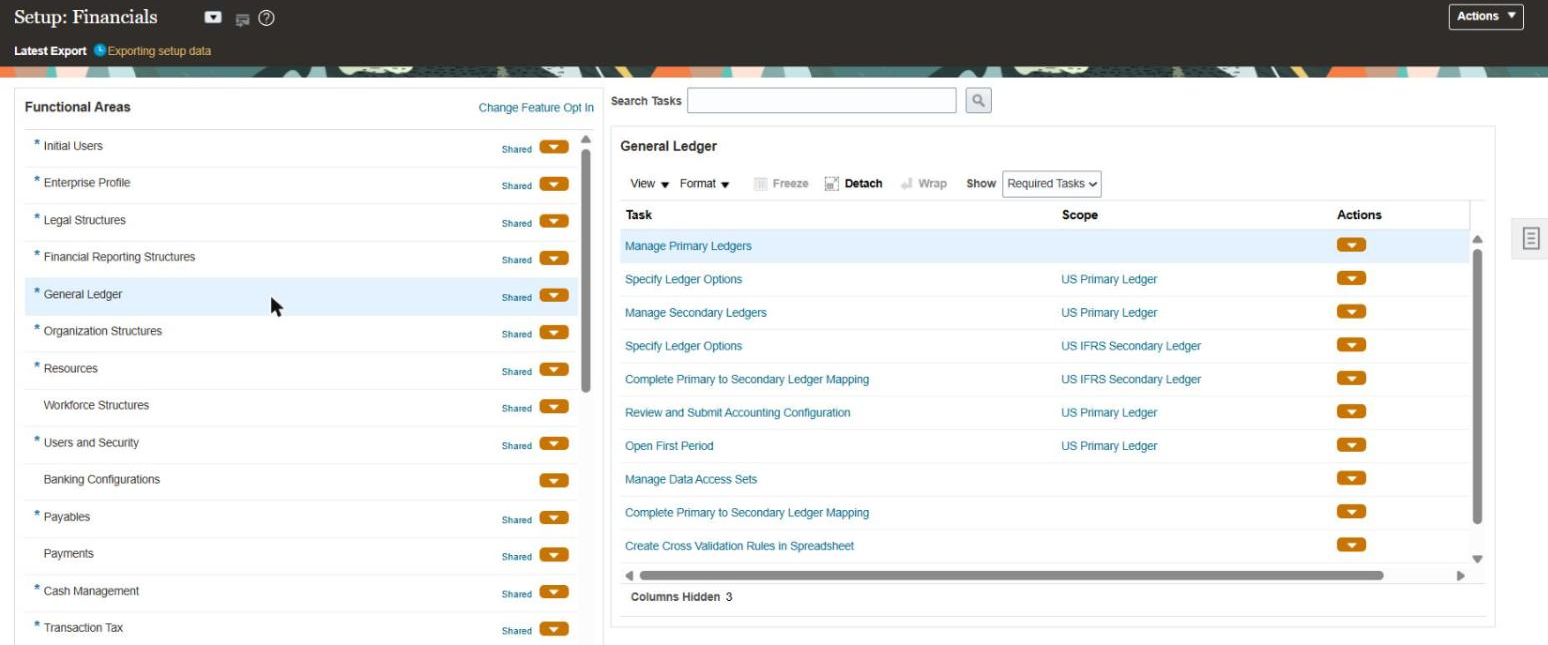
The General Ledger task list in Setup: Financials.

Manage Primary Ledgers after the import: 10602FSMLedger exists, with no description yet.
Opening the Specify Ledger Options task with its scope set to 10602FSMLedger shows the options the import left behind:
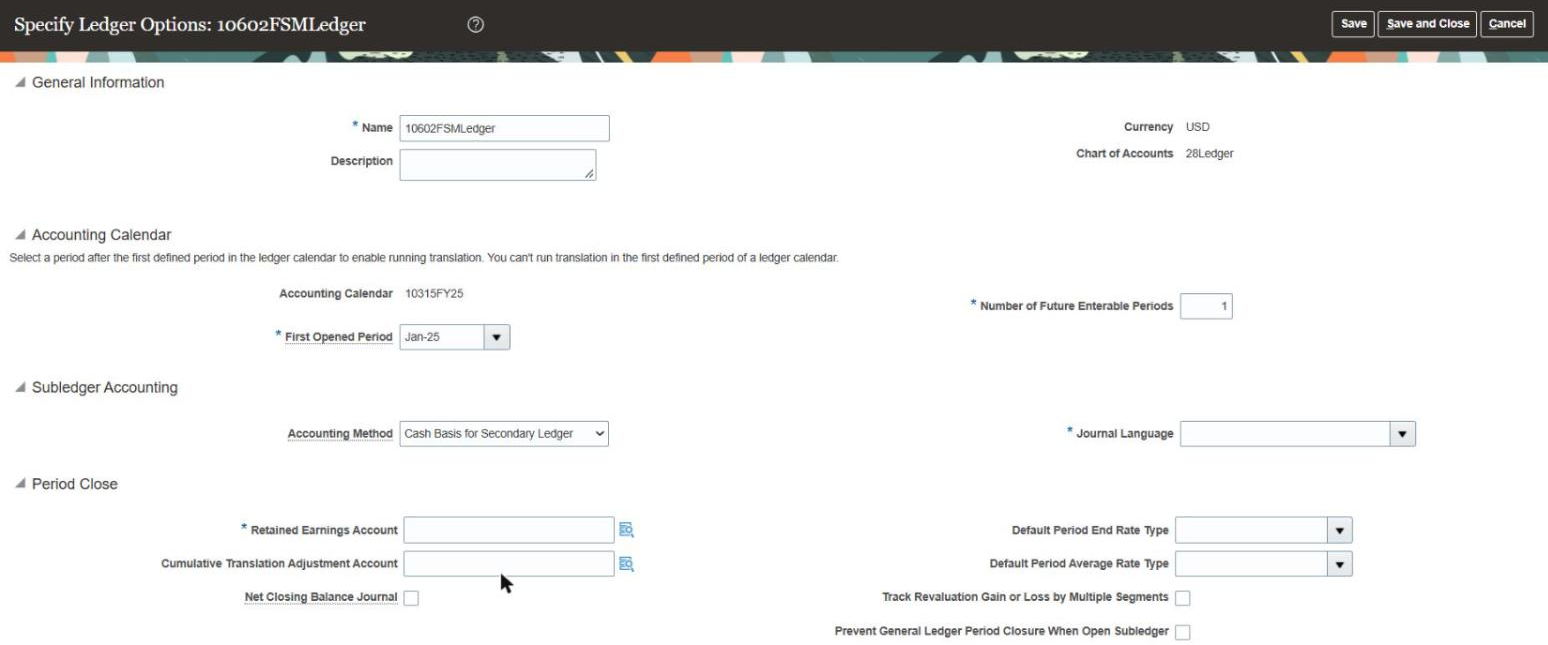
Specify Ledger Options right after the create: no description, one future enterable period, and Journal Language and Retained Earnings Account empty.
Journal Language and Retained Earnings Account are both marked as required on that page, and the import left both of them blank. Those turned out to be the two fields the Specify Ledger Options imports were rejected for.
4. Change the ledger through Specify Ledger Options
For the update I exported GL_SPECIFY_LEDGER_OPTIONS, and this time I scoped the export to the one ledger by adding export criteria to the body:
{
  "TaskCode": "GL_SPECIFY_LEDGER_OPTIONS",
  "SetupTaskCSVExportCriteria": [
    {
      "TaskCode": "GL_SPECIFY_LEDGER_OPTIONS",
      "BusinessObjectCode": "GL_PRIMARY_LEDGER",
      "AttributeSet": "Set1",
      "AttributeName": "PRIMARY_LEDGER_ID",
      "AttributeValue": "300000335865742"
    }
  ],
  "SetupTaskCSVExportProcess": [ { "TaskCode": "GL_SPECIFY_LEDGER_OPTIONS" } ]
}
It returned only that ledger, with Description, SlaDescriptionLanguage and RetEarnCcidSegments blank, FutureEnterablePeriodsLimit at 1, and ShortName set to 300000335865742. I built the update package from that export. I kept the metadata file and every CSV as exported, blanked the audit columns again, left ShortName as exported (FSCR's rules for this task also say to keep the exported value), and made my changes to the ledger's row in both GL_PRIMARY_LEDGER.csv and GL_SECONDARY_LEDGER.csv. I imported it with the same call as before, using the task code GL_SPECIFY_LEDGER_OPTIONS.
The changes I wanted were a description and FutureEnterablePeriodsLimit raised from 1 to 2, but the package also has to fill in the two required fields that the create left blank, Journal Language and Retained Earnings Account, because Fusion validates the whole row on import. If either one is missing, Fusion rejects the package with 0 of 3 objects succeeded and a StatusCode of COMPLETED_ERRORS. These are the errors it returns for each, from imports that left the field out (requests 10168072 and 10168073), as they appear in the decoded process log with the empty XML tags at the end removed:
Business object: Ledger Configuration. Status: Completed with errors. Status details:
JBO-GL:::GL_ASM_SLAM_DESC_LANG: <MESSAGE><NUMBER>GL-781444</NUMBER><TEXT>You must specify a
journal description language because there's a subledger accounting method already assigned
to the ledger.</TEXT>...
Business object: Ledger Configuration. Status: Completed with errors. Status details:
JBO-GL:::GL_ASM_INVALID_RET_EARN_TYPE: <MESSAGE><NUMBER>GL-781323</NUMBER><TEXT>You must specify
an enabled balance sheet account that's postable but not a summary account to be used as the
retained earnings account.</TEXT>...
GL-781444 and GL-781323 are the message numbers, and GL_ASM_SLAM_DESC_LANG and GL_ASM_INVALID_RET_EARN_TYPE are the internal codes behind them. The language error appears because the model ledger has a subledger accounting method assigned but had never had its options saved. For the value, 150 of the 159 primary ledgers in the export have SlaDescriptionLanguage set to US, 8 are blank and one has F, so I used US. For retained earnings I used 01-000-3110-01, an enabled, postable owner's equity account on the ledger's chart of accounts. The hard part was the format, because RetEarnCcidSegments takes neither the code combination ID nor the hyphenated account string. The other ledgers' rows in the export show what it expects, which is a single quoted field holding the segment values separated by line feeds, padded with empty slots out to 30 segments and ending in a line feed. All 155 populated values in the export have exactly 30 line feeds and no carriage returns. This is an existing ledger's value as it appears in the export:
"110\n00000\n31900\n00\n00000\n000\n000\n00000\n\n\n\n\n\n\n\n\n\n\n\n\n\n\n\n\n\n\n\n\n\n\n"
I wrote ours the same way, as "01\n000\n3110\n01\n" followed by 26 more line feeds, and with both fields filled in the import (request 10168074) went through with 3 of 3 objects succeeded, no failed rows and a StatusCode of COMPLETED.
To confirm the change I ran the scoped export again. It came back with the new description, FutureEnterablePeriodsLimit at 2, SlaDescriptionLanguage at US, RetEarnCcidSegments identical to what I sent, and ShortName still 300000335865742. The UI shows the same thing:

Manage Primary Ledgers after the update, with the new description on 10602FSMLedger.
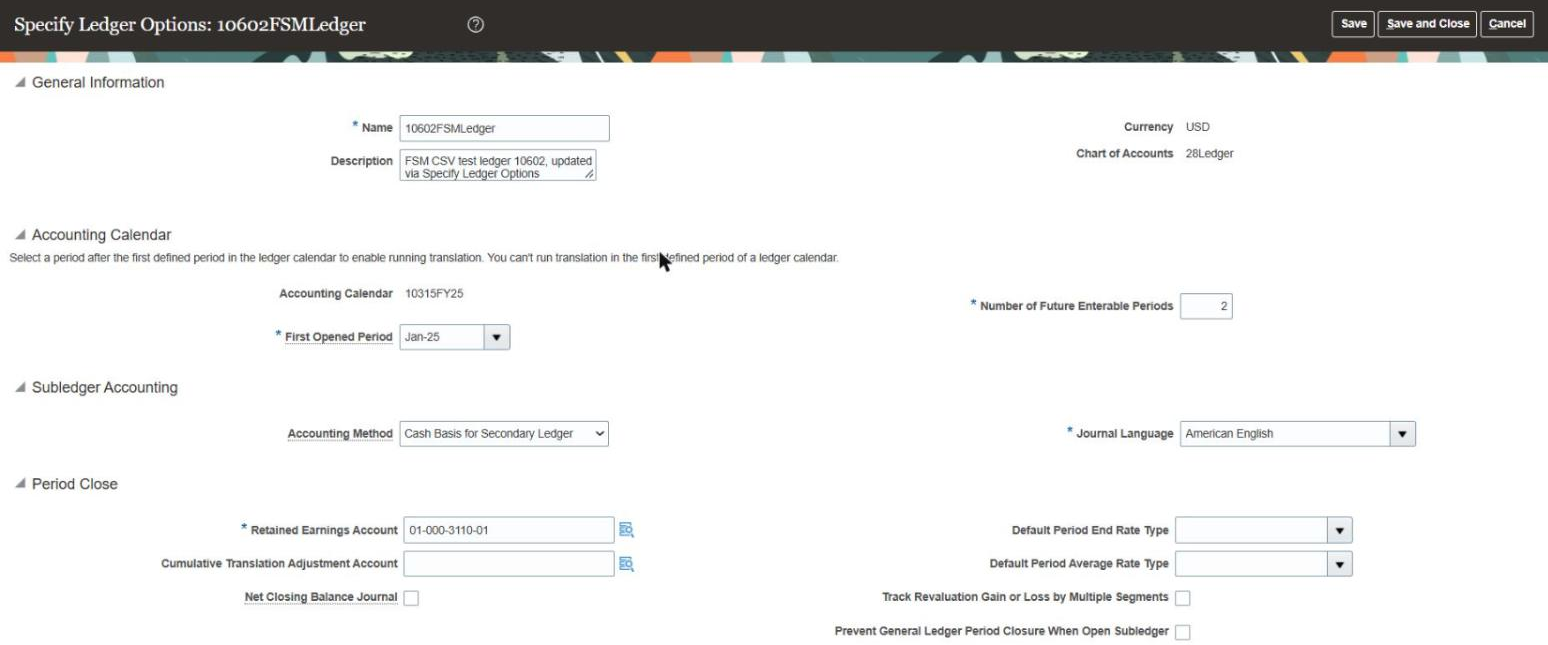
Specify Ledger Options after the update: description set, two future enterable periods, Journal Language American English and Retained Earnings Account 01-000-3110-01.
These are the columns that differed between the row I created and the row I sent back:
| Column | Created with | Sent back |
|---|---|---|
Description | blank | FSM CSV test ledger 10602, updated via Specify Ledger Options |
ShortName | blank, and Fusion set it to the ledger ID | unchanged, 300000335865742 as exported |
FutureEnterablePeriodsLimit | 1 | 2 |
SlaDescriptionLanguage | blank | US |
RetEarnCcidSegments | blank | 01, 000, 3110 and 01 as a 30-slot value separated by line feeds |
Between the row I sent back and the row Fusion exported afterwards, the only differences were the five audit columns.
FSCR's rule files for Specify Ledger Options cover both failures. They cite GL-781444 by number and describe the 30-slot format for RetEarnCcidSegments correctly, although they never mention GL-781323 by number. They do cover that failure under its internal code: the skill's ora_error_handling.md has an entry for GL_ASM_INVALID_RET_EARN_TYPE that tells the agent to check how RetEarnCcidSegments was encoded (a CCID, the hyphenated display string, the wrong number of slots or a missing final line feed) before blaming the account itself. The rule files also say to look up the language code from Fusion's languages list of values rather than hard-coding US, which is the safer approach. Apart from the missing error number, the rules matched what Fusion actually did.
What it doesn't cover
- Transactions are out of scope. FSCR covers setup plus a little master data (suppliers, items, price lists, some TCA). Journals, invoices, balances and open POs are still a data migration problem.
- Procurement approval setup is advisory only, and HCM approval rules are the one approvals area with a REST route.
- FSCR knows Fusion, but it doesn't know your EBS, PeopleSoft or JD Edwards setup, so turning a legacy configuration into Fusion values is still your mapping work.
On the hosted side, AI Success Navigator was announced today with no general availability date or pricing that I could find.
What it means for implementation teams
For planning and design, FSCR is useful today. The setup task catalog, the CSV-support flags, the dependency and sequencing guidance and the product guidance make a better starting point than most of the configuration workbooks I've inherited on projects. Even if you never let an agent near a pod, you can point one at FSCR and get a solid first draft of a configuration plan.
For execution, the FSM import route matters more to me than the agents do. FSM CSV export and import can be scripted for a large share of setup tasks, Fusion validates the data on import just as it does in the UI, and FSCR has catalogued which tasks support it. In my own migration tool I had about thirty configuration objects scheduled for Playwright UI automation because I believed there was no API, and FSCR's catalog marks twenty-three of them as CSV-capable. I can replace those twenty-three fragile UI scripts with an export, a transform and an import, and let Fusion do the validation.
Where I'd be careful is the "agent performs the work" framing. The repository itself is cautious, with approval gates, planning before execution, no stored credentials and a rule to stop when anything is ambiguous, and anyone who does run the agents should keep all of that switched on. An agent with an OAuth token and a CSV import endpoint can make a lot of one-way mistakes very quickly, which is why, as I said at the top, I'd keep the LLM away from the load itself.
My overall assessment
FSCR is the most significant thing Oracle has done for configuration automation in a long time, and it's honest about being early. You can use the catalog and the guardrails now, and FSM CSV import works and is the route I'd build on. The HCM Data Loader route for ERP, SCM and CX setup is registered, but its templates don't generate and some objects, such as supplier import, aren't registered on my pod yet.
If you implement Fusion, clone the repository this week and read the catalog for your pillar, even if you never run an agent against it. If you build migration or configuration tooling, the CSV-support flag and the FSM import route are worth more to you right now than anything else in the announcement.